
PAN Card Photo & Signature Size Guidelines (2026-2027): NSDL & UTIITSL 213x213 px Crop, 300 DPI & Resizer Guide
Official 2026-2027 guidelines for NSDL (Protean) & UTIITSL PAN card applications: Exact 213x213 pixels photo (20-50KB), 300 DPI resolution, and signature (10-20KB) with instant free resizer.

Written by Aaradhya Pathak
Founder, Snab Innovations · Researched against official portal guidelines
Dimensions, file size rules, and accepted formats are verified against official portal notices. Tools on FileZenith process files directly inside your browser memory for complete privacy.
Use Tool Directly in Browser
Your files never leave your browser. 100% free, zero login required.
Applying for a new Permanent Account Number (PAN Card) or requesting an update via Protean (formerly NSDL e-Gov) or UTIITSL (UTI Infrastructure Technology and Services Limited) is an essential milestone for every Indian citizen, student, and business entity.
However, over 40% of online PAN card applications (Form 49A and Form 49AA) get halted or flagged under document rejection queues due to one specific hurdle: strictly enforced photograph and signature pixel dimensions and byte caps.
Unlike general job portals that allow flexible resolutions, the Income Tax Department’s automated validation gateways enforce exact micro-specifications:
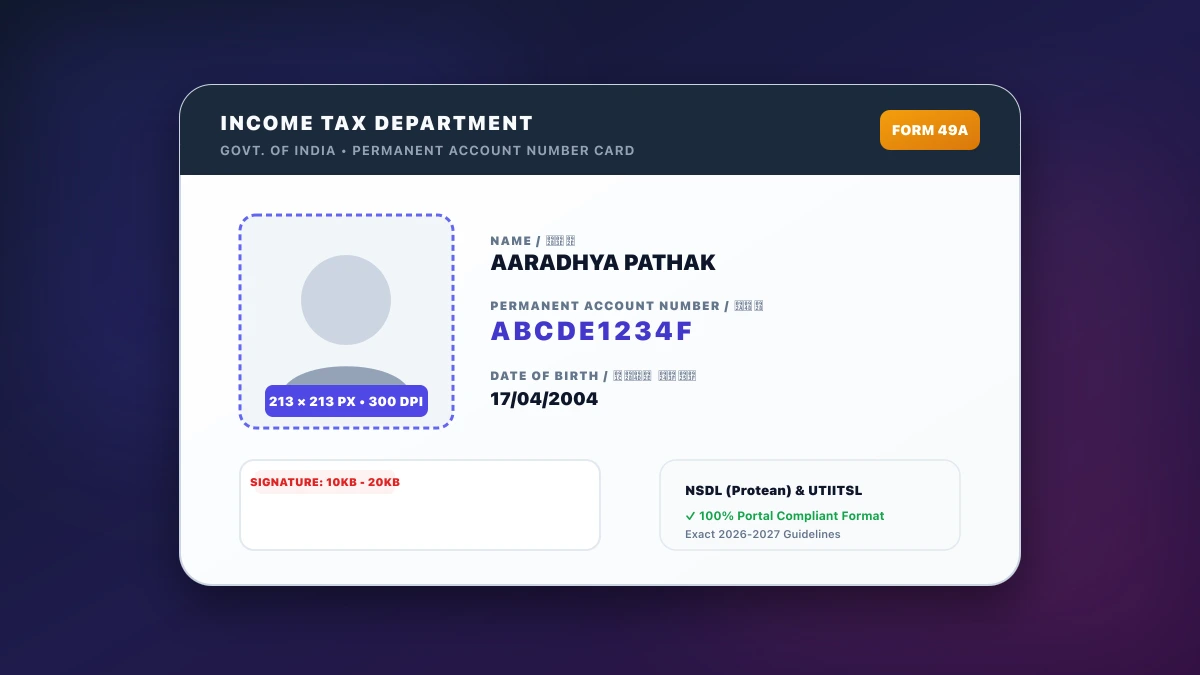
- Photograph: Exactly 213 × 213 pixels at 300 DPI resolution between 20 KB and 50 KB.
- Signature: Exactly 400 × 200 pixels (or 2.0 cm × 4.5 cm) at 600 DPI (or 200 DPI) between 10 KB and 20 KB.
If your image deviates by even 1 single pixel or exceeds 50.1 KB, the upload gateway immediately throws the error: "Invalid image dimensions. Please upload a photo with 213 x 213 pixels and 300 DPI".
In this comprehensive 2026–2027 manual, we break down the official Income Tax Department image parameters, explain the science behind 213×213 px scaling, and show you how to crop, align, and compress your assets in seconds using FileZenith’s free in-browser tools.
Quick Reference Table: Official NSDL & UTIITSL PAN Image Specifications#
Save this reference table before uploading your identity documents to the Protean or UTIITSL portals:
| Parameter | Passport Photograph | Applicant Signature | Supporting Proof (Aadhaar / Address) |
|---|---|---|---|
| Exact Pixel Dimensions | 213 × 213 pixels (Square 1:1) | 400 × 200 pixels (or 213 × 106 px) | Standard A4 Page (Vector/Raster) |
| Physical Dimensions | 2.5 cm × 2.5 cm (or 3.5 cm × 2.5 cm) | 2.0 cm height × 4.5 cm width | Standard A4 Sheet (210 × 297 mm) |
| Scanning Resolution | 300 DPI (Dots Per Inch) | 200 DPI to 600 DPI | 200 DPI High-Res |
| Strict File Size Cap | 20 KB to 50 KB | 10 KB to 20 KB | Under 300 KB (or 200 KB) |
| Color Mode | True Color (24-bit RGB) | Monochrome (Black & White) | Color / Grayscale |
| Accepted Formats | JPEG / JPG | JPEG / JPG | PDF (Multipage for corrections) |
| Background & Visuals | Plain white or light off-white | Pure white unlined paper; black ink | Crisp text scan with zero blur |
⚠️ The 213×213 Pixel Mystery Explained: Why does the PAN card portal demand 213×213 pixels instead of standard passport size (350×450 px)? On a physical plastic PVC PAN card, the photo box measures exactly 1.8 cm × 1.8 cm (0.71 inches). At 300 DPI print quality,
0.71 inches × 300 DPI ≈ 213 pixels. The portal requires an exact 1:1 crop to prevent facial distortion on the physical laminated card.
Common Rejection Traps on NSDL and UTIITSL Portals#
1. Uploading Standard 3.5 × 4.5 cm Photos Without Cropping
Most candidates try uploading their standard passport photo (aspect ratio 7:9). The PAN upload engine automatically squishes the rectangle into a 213×213 square, resulting in an artificially flattened or stretched face that fails biometric inspection. Always crop your photo to a 1:1 square before uploading.
2. Using Low-Resolution 72 DPI Mobile Photos
Smartphone cameras shoot in 72 DPI screen resolution by default. While the image looks sharp on a phone screen, the PAN printing press requires 300 DPI metadata to print fine micro-security patterns. If the metadata lacks 300 DPI tags, UTIITSL returns "DPI check failed".
3. Signing with Blue or Gel Ink Pens
While NSDL technically permits dark blue ink, UTIITSL optical scanners frequently fail to detect blue ink strokes against white paper. Always sign using a dark black ballpoint or fiber-tip pen on crisp, unlined 75 GSM printer paper.
4. Shadowed or Yellowish Backgrounds
Photos captured against textured bedroom walls, wooden doors, or under yellow incandescent bulbs will be rejected. The background must be pure white or light grey with uniform lighting across both cheeks.
Step-by-Step: How to Resize Photo & Signature for PAN Card in 3 Clicks#
You do not need Adobe Photoshop or expensive cyber cafe services. You can prepare 100% compliant PAN files directly inside your browser:
[Take Clean Smartphone Photo]
       │
       ▼
[Crop to 1:1 Square (213x213 px)] ──▶ [Set 300 DPI Density] ──▶ [Lock Size Under 50KB]
       │
       ▼
[Upload to NSDL / UTIITSL Portal with Guaranteed Acceptance]
- Crop Passport Photo to 213×213: Open FileZenith’s Passport Photo Maker. Select your photo, choose the 1:1 PAN Card preset, and let the canvas lock the dimensions to exact 213×213 pixels at 300 DPI.
- Compress Photo Under 50KB: Ensure the output slider stays between 25 KB and 45 KB. FileZenith’s binary search engine automatically prevents the file from exceeding 50 KB.
- Format Signature (10KB to 20KB): Open the Signature Resizer Tool. Crop tightly around your black ink signature, remove paper shadows, and download a crisp 400×200 px file calibrated between 12 KB and 18 KB.
- Combine Supporting Documents into PDF: If submitting identity, address, and date of birth proofs, merge them into a single clean PDF under 300KB using Compress PDF to 200KB.
Recommended Free FileZenith Utilities for PAN Card Applicants#
- Passport Photo Maker (213x213 PAN Preset): Dedicated 1:1 square crop with built-in 300 DPI metadata injection.
- Signature Resizer 10 to 20KB: High-contrast black ink cleanup and strict byte-size locking.
- Compress PDF to 200KB: Shrink Aadhaar card and address proof PDFs under official portal limits.
- Government Job & Identity Tools Hub: Complete suite of official exam and government ID photo tools.
- Aadhaar Card Print Tool: Format e-Aadhaar PDF into exact ISO ID-1 physical dimensions for printing.
Frequently Asked Questions (FAQ) — PAN Card Photo & Signature#
1. What is the exact photo size for PAN Card application in 2026?
The photo must be a recent color passport photograph cropped to 213 × 213 pixels (square 1:1 aspect ratio) at 300 DPI resolution, with a file size strictly between 20 KB and 50 KB in JPEG/JPG format.
2. Can I use a signature signed with a blue pen on UTIITSL?
While blue ink is occasionally accepted, black ink is officially recommended by both NSDL and UTIITSL. Black ink produces higher optical contrast during high-speed scanner digitization and prevents rejection due to faint signature lines.
3. How do I get 300 DPI resolution without Photoshop?
FileZenith’s Passport Photo Maker automatically embeds the standard 300 DPI JFIF resolution header directly into your downloaded JPEG file using browser canvas metadata injection, meeting all government portal requirements without third-party software.
4. What is the signature size in cm for PAN card?
The physical signature box on physical PAN card Form 49A measures 2.0 cm in height by 4.5 cm in width. For online upload, this translates to 400 × 200 pixels (or 213 × 106 px) between 10 KB and 20 KB.
5. Why did NSDL reject my photo even though it was under 50KB?
Even if your file is under 50KB, the portal will reject it if the pixel dimensions are not exactly 213×213, if the background is not plain white, or if the photo is blurry or shot in 72 DPI without proper aspect ratio scaling.
6. Are my personal photos and signatures safe on FileZenith?
Yes, 100%. FileZenith operates entirely inside your local device RAM using client-side WebAssembly and HTML5 Canvas. Your photos, signatures, and identity documents are never uploaded to any remote server or stored in any database.
Explore Related FileZenith Tools
- Quick Reference Table: Official NSDL & UTIITSL PAN Image Specifications
- Common Rejection Traps on NSDL and UTIITSL Portals
- Step-by-Step: How to Resize Photo & Signature for PAN Card in 3 Clicks
- Recommended Free FileZenith Utilities for PAN Card Applicants
- Frequently Asked Questions (FAQ) — PAN Card Photo & Signature