

The Ultimate Passport Size Photo Maker Guide: Dimensions, Background Rules, and Online Form Specs
Everything you need to create official 2x2 inch and 3.5x4.5 cm passport and visa photos online for US Visa, Schengen, Indian Passport, UPSC, and SSC without visiting a photo studio.
Reviewed by FileZenith Editorial Board
Fact-Checked for Official 2026-27 Notification Standards
Dimensions, file size rules, and accepted formats are verified against current SSC, UPSC, NTA, and State PSC guidelines. Zero-server guarantee: images and signatures are processed locally inside your web browser.
Use Tool Directly in Browser
Your files never leave your browser. 100% free, zero login required.
Visiting a commercial photo studio just to get six passport-size prints or a digital headshot often costs anywhere from $15 to $30 (or ₹150–₹300 in India). Even worse, studio photographers frequently apply over-saturated skin-smoothing filters, unnatural contrast boosts, or improper dimensions that cause embassy visa systems and competitive exam portals to flag and reject your photo.
With modern smartphone cameras packing 48 to 200 megapixels, you already possess a sensor capable of professional portraiture. All that is missing is the exact dimensional formatting, face ratio framing, and compliant background color.
In this definitive guide, you will learn how to prepare 100% compliant biometric passport and visa photos from home using our free Online Passport Photo Maker.
Global Passport & Visa Photo Specifications Cheat Sheet#
Different countries and examination boards enforce distinct aspect ratios, physical millimeter measurements, and digital pixel minimums. Use this comparison table to identify your exact requirements before taking your photo:
| Country / Purpose | Physical Size (cm / inches) | Digital Dimensions (Pixels @ 300 DPI) | Background Color | Face Height Coverage |
|---|---|---|---|---|
| US Visa / Green Card (DS-160) | 2 x 2 inches (51 x 51 mm) | 600 x 600 px (Square 1:1) | Pure White or Off-White | 50% to 69% (1" to 1 3/8") |
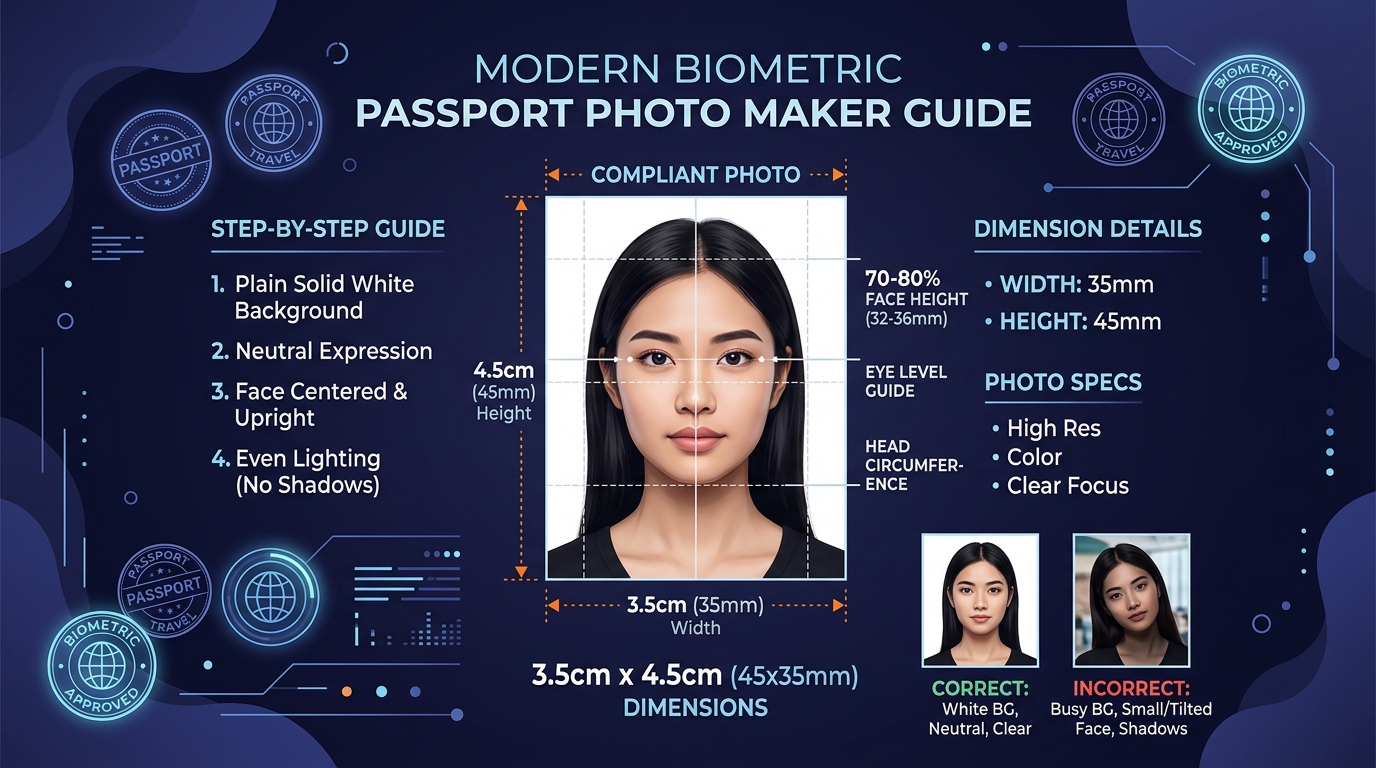
| Indian Passport / OCI / PAN Card | 3.5 x 4.5 cm (35 x 45 mm) | 413 x 531 px | Plain White / Light Grey | 70% to 80% (31 to 36 mm) |
| Schengen Visa (Europe 27 Countries) | 3.5 x 4.5 cm (35 x 45 mm) | 413 x 531 px | Plain Light Grey / White | 70% to 80% (32 to 36 mm) |
| UK Passport / HMPO | 3.5 x 4.5 cm (35 x 45 mm) | 413 x 531 px (or 900 x 1200 px digital) | Plain Light Grey / Cream | 65% to 75% (29 to 34 mm) |
| Canada Visa / Permanent Residency | 5.0 x 7.0 cm (50 x 70 mm) | 590 x 826 px | Pure White or Plain Light | 31 mm to 36 mm |
| SSC / UPSC / RRB Government Exams | 3.5 x 4.5 cm | 350 x 450 px (File: 20KB–50KB) | White or Light Background | 75% to 80% |
The Biometric "Golden Rules" for 100% Approval#
Before editing, follow these five essential rules when snapping your raw portrait photo:
- Camera Position at Eye Level: Have a friend hold the camera (or mount your phone on a tripod) approximately 1.5 to 2 meters (5 to 6 feet) away at direct eye level. Never use wide-angle selfie mode from an arm's reach—it distorts facial features by enlarging the nose and shrinking the ears.
- Neutral Lighting Without Hard Shadows: Stand facing a large window during daylight hours. Diffused, indirect sunlight evenly illuminates both sides of your face and eliminates harsh shadows behind your ears and under your chin.
- Neutral Facial Expression: Keep both eyes fully open and mouth gently closed. Smiling with visible teeth is an automatic reason for rejection by biometric immigration scanners.
- Eyeglasses and Headwear Guidelines: Eyeglasses are strictly prohibited for US Visa photos and Indian passport submissions unless medically required with a signed doctor's note. Head coverings for religious reasons are permitted as long as the full oval of the face (from bottom of chin to top of forehead) is completely visible.
- Clothing Contrast: Wear dark or colored clothing (navy blue, charcoal, burgundy) so your shoulders contrast sharply with the white or light-grey background.
3-Step Walkthrough: Create Compliant Photos in FileZenith#
Creating your passport photo with FileZenith Passport Photo Maker takes under 60 seconds and requires zero design experience.
Step 1: Upload Your Casual Portrait
Go to the Passport Photo Maker. Upload your picture directly from your camera roll or desktop.
Step 2: Auto-Remove Background & Align Face Guides
- If your photo was taken against a bedroom wall or curtains, click Auto-Clean Background. Our browser-powered AI instantly strips clutter and replaces it with a clean, compliant solid white or light-grey canvas using our Background Remover.
- Align your face with our built-in biometric overlay lines (Top of Head, Eye Level, and Chin Baseline). The tool guarantees that your face occupies the mandatory 70% to 80% area.
Step 3: Choose Destination Preset & Export
Select your target standard:
- US Visa (2x2")
- Indian Passport (3.5x4.5cm)
- Schengen Visa (35x45mm)
- Competitive Exams (SSC/UPSC/NEET)
Click Generate Printable Sheet (4x6" / A4) to print multiple copies at home or local pharmacy, or click Download Single Digital Headshot formatted to the exact KB file size and pixel dimensions required for online form uploads.
Pro Tip: Matching Strict File Size Requirements (20KB - 50KB)#
Most government recruitment boards (like SSC CGL, UPSC, and State Police recruitment) require your digital photo to be between 20KB and 50KB in JPEG format.
If your high-resolution phone photo exports at 800KB:
- Open our Compress Image to 50KB Tool.
- Upload your generated passport picture.
- The compression engine will optimize quality quantization tables to deliver an exact 35KB–45KB JPEG file that uploads smoothly with zero errors.
- If you also need to upload your signature, use our Resize Signature Online tool to generate the matching 10KB–20KB signature file.
Frequently Asked Questions (FAQ)#
Can I take my own passport photo with an iPhone or Android phone?
Yes! Modern smartphone cameras produce image quality far superior to required passport specifications. The key is to take the photo in bright daylight against a plain wall from 5-6 feet away, and use FileZenith's Passport Photo Maker to crop, center, and verify dimensions.
Mobile se passport size photo kaise banaye online free?
Mobile me FileZenith ka Passport Size Photo Maker kholein. Apni simple selfie ya photo upload karein. Tool automatically background ko white kar dega aur face ko 3.5 x 4.5 cm ya 2x2 inch standard size me crop kar dega. Phir aap single photo ya 4x6 print sheet free me download kar sakte hain.
What is the difference between US Visa photo and Indian Passport photo?
The US Visa photo is a square format measuring 2 x 2 inches (51 x 51 mm or 600x600 pixels) on a pure white background with 50-69% face coverage. The Indian Passport photo is rectangular measuring 3.5 x 4.5 cm (35 x 45 mm or 413x531 pixels) with 70-80% face coverage on a white or light-colored background.
Why do embassies reject passport photos?
The top 4 reasons for photo rejection are:
- Uneven shadows across the face or background.
- Tilting the head or looking away from the camera lens.
- Glare or flash reflections on eyeglasses.
- Over-compressing the image into blurry, pixelated artifacts.
How can I print multiple passport photos on one sheet?
In our Passport Photo Maker, select Export Printable Grid. You can choose a standard 4x6 inch (10x15 cm) photo sheet containing 6 or 8 passport photos. You can print this at any local pharmacy or photo kiosk for just a few cents.
Related Tools & Helpful Guides#
- Passport Size Photo Maker — Create official passport and visa headshots online for free.
- AI Background Remover — Erase busy backgrounds and replace with solid white or transparent backgrounds.
- Resize Signature Online — Format official signatures for SSC, UPSC, and bank exams.
- Compress Image to 20KB — Reduce photo file size for strict government application limits.
- Compress Image to 50KB — Perfect for online college entrance tests and visa portals.
- SSC Photo Size Requirements Guide — Specific criteria for Staff Selection Commission candidates.